



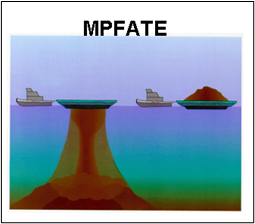
MPFATE is the Multiple Placement FATE of dredged material in open water model. MPFATE represents the accumulation of sediment resulting from multiple dredged-material placements (DMP) during a dredging cycle. This model is used for DMP planning for maximization of site capacity, consideration of dredged material dispersion outside site boundaries, and prevention of navigation hazards. The MPFATE model works by running a subset of code from the Short-Term FATE of disposal in open water model (STFATE) to simulate the processes of a single DMP operation and then runs the same subset of code with new input variables for each successive DMP operation.
The objective of MPFATE is to incorporate improved understanding of sediment processes and dredged material placement practices into a numerical framework that permits dredged material managers to predict interim and final mound configurations at open-water placement sites.
Current Version
MPFATE V2.5
Point of Contact
tahirih.c.lackey@usace.army.mil and jarrell.smith@usace.army.mil
Installing MPFATE v2.5
Follow the instructions below to install MPFATE and the model interface on a Microsoft Windows PC.
- Install the Matlab Runtime Compiler Release R2023b (version 23.2), available from The Mathworks at the following link: https://www.mathworks.com/products/compiler/matlab-runtime.html. Pay close attention that the specific version indicated above is installed, as the MPFATE executables must match this specific version and will not run for earlier or later versions.
- USACE (ACEIT) users can find the MCR version above on the ACEIT App Portal.
- Download the program executables and documentation from:
https://rdedrivepub.erdc.dren.mil/url/mpfate
password: yzy6tidr - Extract and copy the executables to a directory c:\mpfate (create if necessary). (Note: You can place these files in any directory, as long as that directory is used in step 4 below.)
- Change the system environment variables to include the directory holding the MPFATE executables. Use the taskbar search window
and type: environment variables. Select change system environment variables (or similar) and you should see a System Properties dialog. Note that the specific appearance of these dialog boxes may vary according to the version of your operating system.Select the Environment Variables button, which will launch an Environment Variables dialog box.
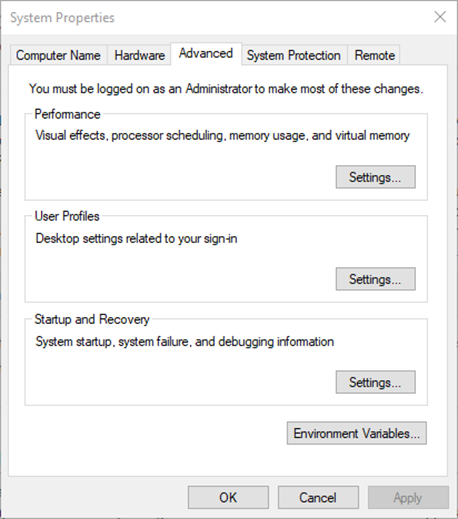
- Under User Variables, select Path then press the Edit button.
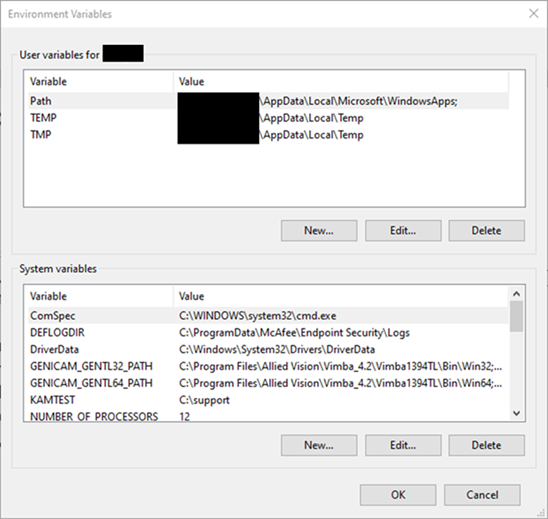
Press the New button and add c:\mpfate to the user environment variables.
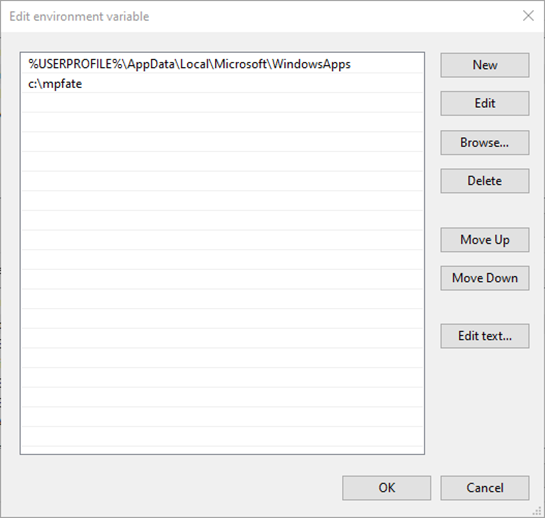
- Press OK to dismiss all of the open dialog boxes.
- Test the installation.
- Launch MPFATE_GUI_v2-5 from the command prompt or by double-clicking the executable. Note that the executable may take 5-10 seconds to launch.
Currently, no Documentation is available.
Currently, no Use Cases or Publications are available.
Currently, no Community Test Cases are available.
Currently, no Software Revision Discussion is available.